> For the complete documentation index, see [llms.txt](https://docs.codewords.ai/llms.txt). Markdown versions of documentation pages are available by appending `.md` to page URLs; this page is available as [Markdown](https://docs.codewords.ai/features/chatgpt-connector.md).
# ChatGPT plugin
Install the CodeWords plugin in ChatGPT to build automations, apps, and websites in chat, then run them on CodeWords. Paid feature.
Use ChatGPT as the place you build, and CodeWords as the place things run. Once the plugin is installed, you stay in ChatGPT — ChatGPT talks to your CodeWords account to create, deploy, and run the work.
In a ChatGPT chat you can:
* Ask ChatGPT to build an **automation**, **app**, or **website** on CodeWords
* Have it write the code, connect apps like Slack, Gmail, and Notion, deploy to the cloud, and schedule runs
* Publish a web app to a live URL from the same chat
* List your workflows, pull up logs, and fix a failed run without leaving ChatGPT
{% hint style="info" %}
The CodeWords plugin is a **paid feature**. You need an active **Pro**, **Business**, or **custom** plan. If you are on the Free plan, [subscribe to a CodeWords plan](https://codewords.agemo.ai/#settings/plans) first. See [Plans and Pricing](https://docs.codewords.ai/pricing) for details.
{% endhint %}
### How it works
You do the building in ChatGPT itself. The plugin links ChatGPT to your CodeWords account so ChatGPT can create, deploy, and run your work there.
**Building stays in ChatGPT.** CodeWords credits are only used when something **runs** — for example, executing a workflow. Planning and building in the ChatGPT chat do not consume CodeWords credits.
### What you can build
* **Automations** — daily digests, lead enrichment, scheduled workflows
* **Apps** — internal tools and backends powered by CodeWords
* **Websites** — landing pages and web apps built and published from chat
### Before you start
Make sure you have:
* An active **Pro**, **Business**, or **custom** plan
* A ChatGPT account
* A [CodeWords](https://codewords.agemo.ai/) account
### Install the CodeWords plugin
{% stepper %}
{% step %}
**Open the CodeWords plugin page**
In ChatGPT, go to the [CodeWords plugin page](https://chatgpt.com/plugins/plugin_asdk_app_6a7449c8406c81919fd7446dd525be72?q=codewords).
You can also open [chatgpt.com/plugins](https://chatgpt.com/plugins) and search for **CodeWords**.
{% endstep %}
{% step %}
**Install the plugin**
On the CodeWords plugin page, tap **Install** (or **Add to ChatGPT**).
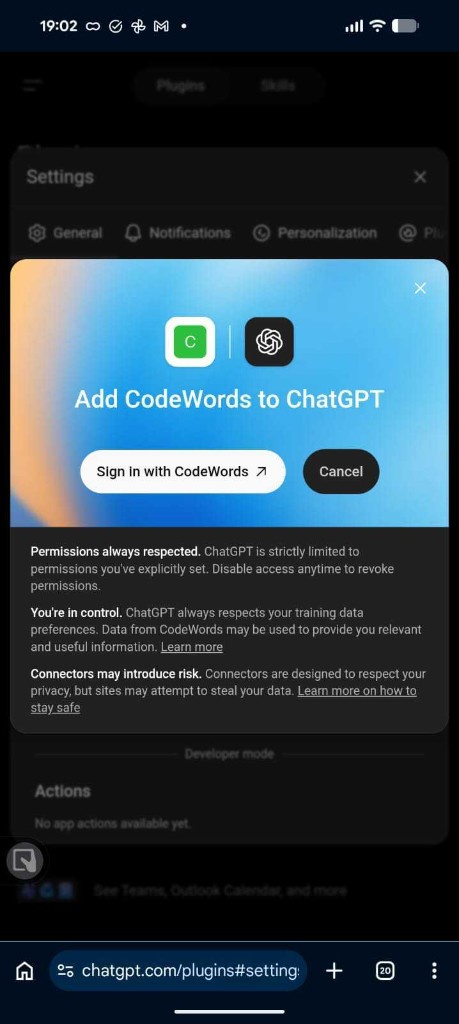
ChatGPT shows **Add CodeWords to ChatGPT**. Tap **Sign in with CodeWords**.
Sign in with CodeWords
{% endstep %}
{% step %}
**Allow access**
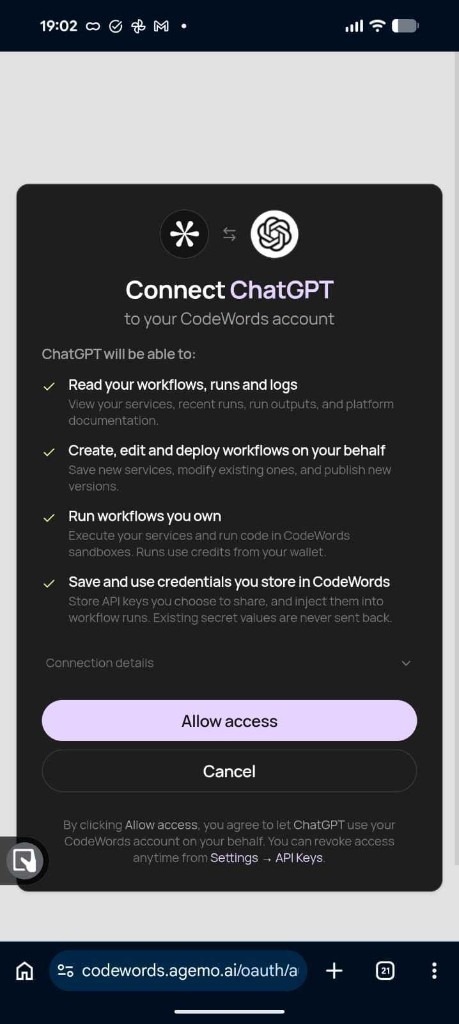
You'll land on a CodeWords screen that lists what ChatGPT can do. Tap **Allow access**.
Allow ChatGPT to use your CodeWords account
In most cases you are connected within a couple of minutes. After that, you can build in ChatGPT and run on CodeWords.
{% endstep %}
{% endstepper %}
### What ChatGPT can do after you connect
* Build automations, apps, and websites with you in chat
* Read your workflows, runs, and logs
* Create, edit, and deploy workflows for you
* Run workflows you own (this uses your CodeWords credits)
* Save and use credentials you store in CodeWords
You can revoke access anytime in CodeWords under [Settings → API Keys](https://codewords.agemo.ai/#settings/api-keys).
### Example prompts
With the plugin installed, try:
> @CodeWords Build me a workflow on CodeWords that checks the London weather and TFL train status every morning and emails me a summary
> @CodeWords Create a UI/web app dashboard on CodeWords that shows my team's weekly metrics and deploy it to a live URL
> @CodeWords My CodeWords workflow failed on the last run — pull up the logs and fix whatever broke
### FAQs
Why does the plugin say it's paid or access denied?
The CodeWords plugin is a paid feature. Make sure you're on a **Pro**, **Business**, or **custom** plan. If you are on the Free plan, [subscribe to a CodeWords plan](https://codewords.agemo.ai/#settings/plans) first.
I can't find the CodeWords plugin. What should I do?
Open the [CodeWords plugin page](https://chatgpt.com/plugins/plugin_asdk_app_6a7449c8406c81919fd7446dd525be72?q=codewords) directly, or search for **CodeWords** on [chatgpt.com/plugins](https://chatgpt.com/plugins).
Sign-in or Allow access fails. What should I do?
Sign in to CodeWords in the same browser first, then go back to ChatGPT and try **Sign in with CodeWords** again.
Can I add CodeWords manually with Developer mode?
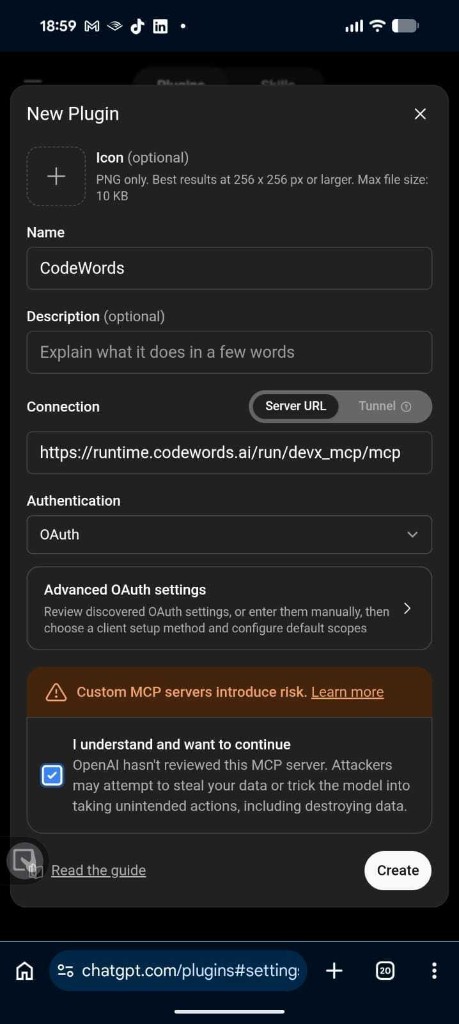
If you need to connect manually, turn on **Developer mode** under **Settings → Security and login** in ChatGPT, then create a new plugin with:
| Field | What to enter |
| ------------------ | ----------------------------------------------- |
| **Name** | `CodeWords` |
| **Connection** | Server URL |
| **Server URL** | `https://runtime.codewords.ai/run/devx_mcp/mcp` |
| **Authentication** | OAuth |
Manual plugin setup with this server URL and OAuth
Only add the official CodeWords server URL above.
Need help? Contact .
---
# Agent Instructions
This documentation is published with GitBook. GitBook is the documentation platform designed so that both humans and AI agents can read, navigate, and reason over technical content effectively. Learn more at gitbook.com.
## Querying This Documentation
If you need additional information that is not directly available in this page, you can query the documentation dynamically by asking a question.
Perform an HTTP GET request on the current page URL with the `ask` query parameter, and the optional `goal` query parameter:
```
GET https://docs.codewords.ai/features/chatgpt-connector.md?ask=&goal=
```
`ask` is the immediate question: it should be specific, self-contained, and written in natural language.
`goal` is optional and describes the broader end goal you are ultimately trying to accomplish on behalf of the user. GitBook uses it to tailor the answer towards what is most useful for that goal.
The response will contain a direct answer to the question and relevant excerpts and sources from the documentation.
Use this mechanism when the answer is not explicitly present in the current page, you need clarification or additional context, or you want to retrieve related documentation sections.